Independent infrastructure project | Multiple WordPress sites
I migrated several WordPress sites I operate from shared hosting to an AWS Lightsail environment in Singapore. I moved them one at a time, tested each copy before changing public DNS and added Varnish and CloudFront only after the origin was stable.
On one older installation, origin troubleshooting reduced the observed time to first byte (TTFB) from roughly 4.9 seconds to 0.75 seconds before page caching. Separately, cached requests on the canary site produced approximately 40–55 ms origin TTFB after Varnish was enabled.
Those are observations from specific checks, not a fleet-wide benchmark or a controlled before-and-after comparison of the same cache state.
Why I changed the hosting setup
The sites worked on shared hosting, but performance was inconsistent and I had limited control over the underlying stack.
I wanted to consolidate them onto one small cloud server while keeping separate domains, HTTPS, backups and manageable administration. I also wanted to be able to reverse a cutover if a migrated site failed validation.
This was an independent project for properties I operate, not a client migration. The sites are intentionally unnamed; this case study focuses on the architecture and migration method.
The environment I built
I provisioned AWS Lightsail in Singapore and installed CloudPanel to manage the individual sites, NGINX and PHP configuration. The stack used MariaDB, Varnish at the origin, Route 53 for authoritative DNS and CloudFront for edge delivery.
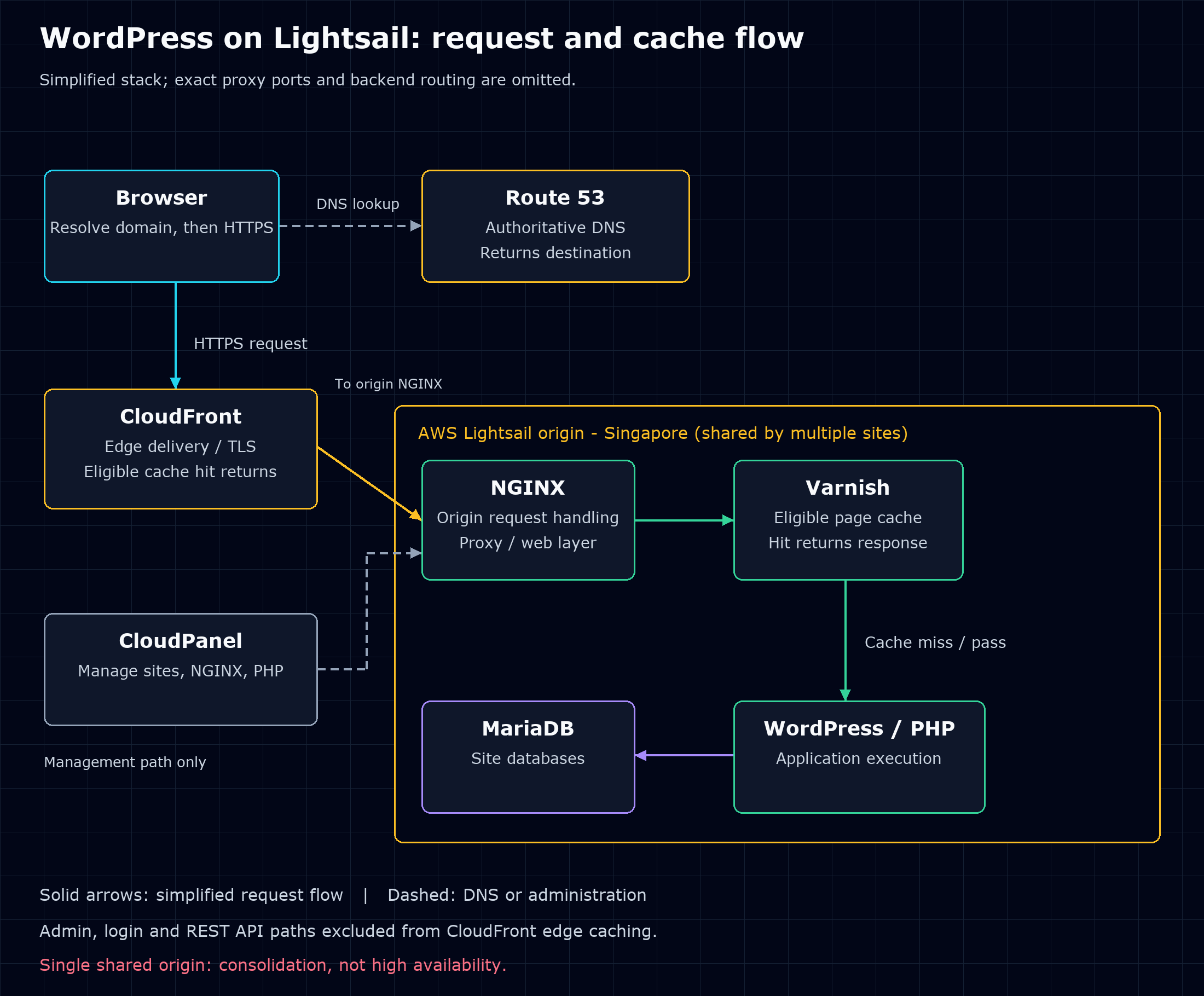
Route 53 resolves the domain; it does not forward the web request. The browser then requests content through CloudFront. On an edge cache miss or an uncached path, the request reaches the Lightsail origin. Varnish can serve eligible cached pages; requests that need application execution continue to WordPress/PHP and MariaDB.
CloudPanel is the management layer, not another service in the request path. The sites remain logically separate but share the server underneath. This is consolidation, not a high-availability architecture: a failure of that single origin can affect multiple sites.
How I staged the migration
For each site, I backed up the WordPress filesystem and database, created a fresh site in CloudPanel, restored the files and imported the original database.
Before changing public DNS, I used a local hosts-file override to test the AWS copy privately. That let me check pages, media, WordPress administration and database behaviour while visitors continued using the old host.
After the new copy worked, I moved authoritative DNS to Route 53, issued the production TLS certificate and completed the cutover. The old hosting environment provided a rollback destination during migration.
This sequence reduced the scope of each change. A problem with one migrated site did not require moving every site back at once. It is not a claim of zero downtime, and the supplied project notes do not record a measured outage duration.
Troubleshooting that changed the result
An incomplete backup caused blank pages
One migrated site was missing WordPress core, plugin and theme files. The incomplete filesystem backup caused PHP errors and blank pages.
I traced the problem through PHP logs, WP-CLI and filesystem inspection. That pointed to the missing files rather than to a need to repeatedly rebuild the server.
Stale DNS sent requests between two hosts
After cutover, an old resolver continued returning the previous host's IP for the root domain while the www hostname resolved to AWS. Redirects between the two hosts produced a loop.
Direct DNS queries and curl made the split visible. It was a useful reminder to inspect both hostnames and the actual destination of a request rather than treating DNS cutover as a single completed event.
Application troubleshooting came before caching
An older WordPress installation initially showed roughly 4.9 seconds TTFB. I isolated plugins and removed unnecessary SSL and browser-caching layers. The observed response time dropped to approximately 0.75 seconds before introducing page caching.
Only after the origin sites were stable did I enable Varnish. Cached requests on the canary site then produced approximately 40–55 ms origin TTFB. I added CloudFront after that stage worked reliably.
I wanted to identify origin faults before an edge cache made them less visible.
What the measurements mean
| Check reported in the project notes | Observed TTFB | Scope |
|---|---|---|
| Older WordPress installation before troubleshooting | Roughly 4.9 seconds | Initial origin observation |
| Same installation after troubleshooting, before page caching | Approximately 0.75 seconds | Application/origin tuning |
| Canary site after Varnish | Approximately 40–55 ms | Cached origin responses; separate check |
TTFB describes the wait for the first response byte. It is not full page-load time. The notes do not specify sample count, measurement location, warm-up or repeated-test conditions, so I would not turn these figures into a universal performance or user-experience claim.
WordPress caching boundaries
I configured CloudFront conservatively. WordPress administration, login and REST API paths were excluded from edge caching, and the origin continued to control cache behaviour.
That boundary matters because a public page and an administrative or personalised response cannot safely share the same caching assumptions. The project description supports those exclusions; it is not a complete security audit or proof that every personalised path was tested.
Outcome
Multiple WordPress sites ran successfully on a single AWS-hosted environment with Route 53, HTTPS, CloudFront, Varnish, NGINX, PHP and MariaDB. I documented migration, validation and rollback procedures.
The work covered design, backup and restore, DNS, TLS, troubleshooting, origin tuning and caching. The result was a hosting stack I could operate and investigate more directly than the previous shared-hosting environment.
Consolidation also created a shared failure boundary. Before extending this setup, I would review resource contention, backup restoration and recovery arrangements. I am not claiming high availability, a measured cost reduction or an uptime percentage from this project.
What I would bring to another migration
I would keep the same staged approach: test the restored application before changing DNS, separate origin tuning from cache tuning and retain a rollback route during cutover. It makes faults easier to isolate and leaves fewer simultaneous changes to explain when something goes wrong.
Project card
WordPress migration to AWS AWS Lightsail · Route 53 · CloudFront · CloudPanel · NGINX · Varnish · PHP · MariaDB
Independent migration of multiple WordPress sites from shared hosting to AWS, using per-site validation and staged DNS cutover. Work included backup/restore, TLS, troubleshooting, origin performance tuning, caching and documented rollback procedures.
Measurement note: performance figures and implementation details are retained from the supplied case-study draft. Raw timings, infrastructure configuration, AWS invoices and production monitoring records were not supplied for this editorial review.