A customer sends an order on WhatsApp. Someone updates Excel. A colleague checks stock, another arranges delivery, and the invoice gets prepared later. For a small team, that can be a perfectly workable setup.
The problem starts when completing a job depends on someone remembering what happened in three different places. My starting question would be simple: can the team see what needs to happen next, who owns it, and which information to trust?
You do not need to replace familiar tools just because the business is growing. You do need to recognise when the way you use them is making work harder to control.
The warning signs are usually operational
Message volume alone is a poor test. A busy team can run a disciplined process, while a quiet team can still lose an important order. Look for repeated failures in the handover.
- The latest update is difficult to find. A revised quantity is in a chat, while the spreadsheet still contains the original request.
- Work has no clear owner. Several people have read the message, but nobody has accepted responsibility for the next step.
- The same details are entered repeatedly. Names, addresses and order items get copied into a tracker, delivery list and invoice.
- Customers become the reminder system. Follow-up happens only when someone asks for an update.
- One person holds the whole picture. When that person takes leave, colleagues struggle to explain what is pending.
One mistake is a reason to investigate. A recurring pattern is a reason to redesign the workflow. A single serious exposure of sensitive information or loss of an essential record deserves immediate attention, even if the process is otherwise quiet.
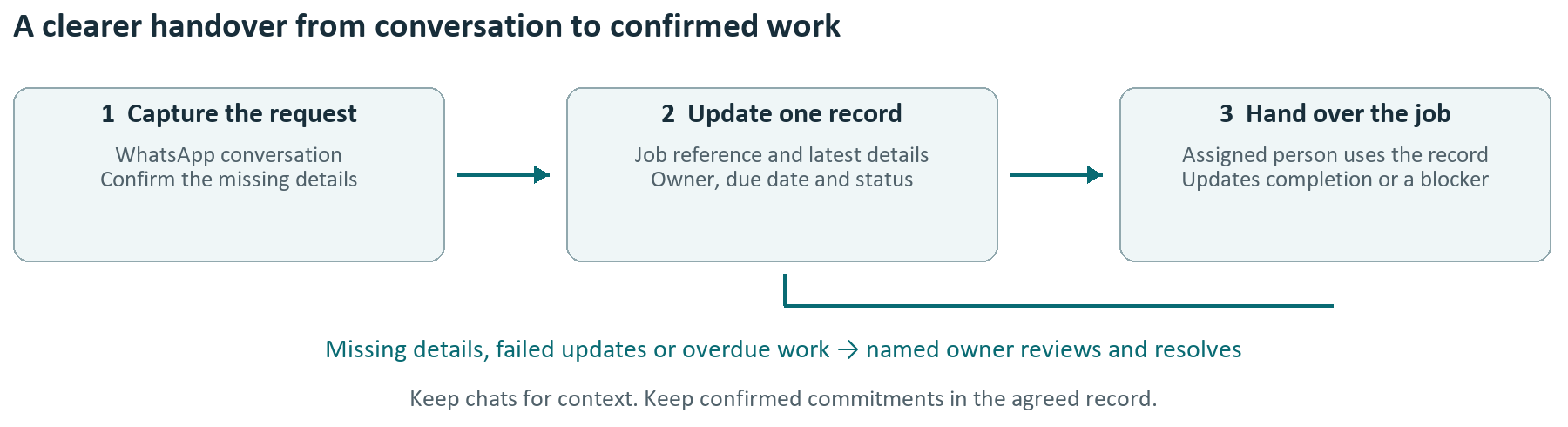
Keep the conversation and structure the commitment
WhatsApp is useful for quick conversations. Excel is useful for calculations, lists and analysis. The gap appears when a conversation becomes an operational commitment without becoming a reliable record.
Consider an illustrative Singapore air-conditioning servicing business. A customer requests a Saturday appointment, changes the address in a later message, and asks for an extra unit to be serviced. The coordinator updates a spreadsheet, but the technician receives an older screenshot. The tools worked; the handover did not.
A better process gives each confirmed job one reference number and one agreed record. That record contains the current address, appointment, scope, assigned technician and status. The chat remains available for context, but a screenshot is no longer the source of job instructions.
Put five controls around one workflow
- Choose the official record. Agree where the latest confirmed information lives. Avoid maintaining several competing master files.
- Define the minimum information. For a service job, this might include a reference, contact, location, scope, owner and due date. Collect only what the work requires.
- Make status meaningful. Use a short sequence such as New, Awaiting confirmation, Scheduled, Completed and Cancelled. Define what must be true before each change.
- Name the next owner. Every open item needs someone responsible for moving it forward, including when the usual person is absent.
- Make exceptions visible. Missing details, failed updates and overdue work need a review list. A reminder sent successfully does not mean the job is resolved.
Start manually if necessary. A well-managed shared tracker can be a useful first improvement. Automating an unclear process tends to move the confusion faster.
Treat access and recovery as part of the workflow
Check who can view, edit, export and share business information. Plan how access changes when staff leave, how records are retained, and how a lost file or device would be handled. Test recovery rather than assuming that synchronisation is a backup.
For customer or staff information, include a deliberate privacy review before connecting tools or giving a provider access. Keep sensitive details out of informal troubleshooting messages and use anonymised examples when seeking help.
Choose the smallest change that restores control
Keep the current tools when work is visible, ownership is clear and mistakes are manageable. Improve the process when the main issue is inconsistent recording or follow-up. Consider connecting tools when the process is stable but repeated copying consumes time.
A dedicated system becomes worth evaluating when you need stronger access control, a dependable history of changes, several people updating work simultaneously, or scheduling and reporting that the current setup cannot support reliably. Those are requirements to test, rather than reasons to buy the first product demonstrated.
If you automate a step, define what happens when it fails. A duplicate message must not create a duplicate job. An incomplete address should enter a review queue. The person monitoring that queue needs a clear way to retry or correct the record.
Run a two week reality check
Choose one workflow, such as enquiry to confirmed booking. For the first week, record how many items arrive, how many require repeated data entry, how many need correction, and how often staff have to chase a status update. Include a few real examples so the numbers have context.
In the second week, introduce one agreed record, a named owner and a short status list. Review open items at an agreed time each working day. Keep the change small enough that the team can follow it during a busy period.
Compare the two weeks cautiously: quieter demand can make a weak process look better. Ask the team whether they can find the latest information faster, cover a colleague’s absence and identify stuck work without searching through chats.
Count the cost before choosing a solution
For illustration, 20 jobs a day with three minutes of repeated entry per job add up to one hour a day, or 22 hours across 22 working days. That is time potentially recoverable, before allowing for checking and exceptions. It is not automatically a cash saving.
Compare that opportunity with setup costs, subscriptions, staff training and ongoing support. Include the cost of errors that matter to your business, without pretending every inconvenience has an exact dollar value.
Start with the handover that keeps breaking
The useful question is whether your team can run the work consistently when things get busy or someone is away. If the answer is uncertain, start with the point where information changes hands.
Sources and further reading
- PDPC: Data Protection Obligations under the PDPA
- IMDA: SMEs Go Digital Programme
- CSA: Cybersecurity Toolkits for Enterprise Leaders and SME Owners
Not sure where to begin?
Start with the process that is taking too much time or creating uncertainty. Discuss the problem with Syahmul Aziz