An AI pilot should answer a business question, not stage a technology demonstration.
For an SME, the useful question is rarely, “Can this tool generate a professional email?” Almost every modern AI assistant can do that in a controlled example. The better questions are: Can it reduce the time employees spend on a recurring administrative task? Can staff review its work efficiently? Can the business protect sensitive information? Will the process still function when the AI is uncertain or unavailable?
A 30-day pilot is long enough to observe real variation but short enough to remain focused. It allows a team to test one bounded use case, collect evidence and decide whether to stop, adjust or expand. Done well, the pilot adds a controlled support layer without forcing employees to change every habit at once.
This guide presents a practical plan for SME leaders who want evidence before making a larger commitment.
What a pilot is—and is not
A pilot is a limited operational test with a defined user group, use case, data boundary and decision date. It is not a company-wide launch with a temporary label.
The pilot should produce four outputs:
- evidence of whether the assistant saves useful time;
- a record of errors, corrections and exceptions;
- an operating procedure covering human review and data handling; and
- a recommendation to stop, redesign, continue or scale.
Avoid measuring success by logins, prompts or generated words. Activity shows that people touched the tool. It does not show that work improved.
A strong pilot is deliberately narrow. For example, the assistant might summarise new enquiries and prepare clarification questions. It should not simultaneously answer customers, manage calendars, review contracts, write proposals and update the CRM.
Choose the right pilot task
The first task should be repetitive enough to measure and low enough in consequence to test safely. It should also contain some language or unstructured information, because fixed rules may be a better solution when every input is already structured.
Good candidates include:
- converting meeting notes into a draft action list;
- summarising website enquiries for internal review;
- drafting standard requests for missing information;
- classifying an internal inbox into predefined categories;
- comparing a submitted document against a checklist; or
- preparing a weekly operational summary from approved notes.
Avoid decisions about hiring, discipline, legal rights, credit, safety or significant payments. Avoid sending customised external communications automatically during the first pilot. The assistant should prepare work for a person, not inherit accountability.
Use a simple readiness test. Can the team provide at least 20 representative examples? Can it describe a good output? Is there an employee who currently owns the task? Can mistakes be detected before causing harm? If the answer to any of these is no, improve the process before adding AI.
Set the baseline before day one
Without a baseline, every result becomes a matter of opinion. Measure the current process for several days or use recent records.
Record:
- average handling time per item;
- weekly volume;
- waiting time between handovers;
- frequency and type of rework;
- percentage completed within the expected timeframe;
- employee frustration or effort; and
- customer-facing errors or complaints, if relevant.
Keep measurement proportionate. A small team does not need a complex analytics platform. A shared worksheet with timestamps and a correction category may be sufficient.
The baseline should include total effort, not only typing time. If an employee spends five minutes drafting and ten minutes searching for context, the real opportunity is fifteen minutes. If the AI draft takes two minutes but requires twelve minutes to verify, the saving is one minute, not thirteen.
Define the safety boundary
Write down what the assistant may access, produce and do.
For example:
Allowed: approved service descriptions, anonymised enquiry examples, the current response template and new enquiries submitted through the managed business account.
Not allowed: staff records, payment details, identity documents, private mailbox access or confidential client documents unrelated to the pilot.
Permitted output: an internal summary, a suggested category and draft clarification questions.
Prohibited action: sending messages, changing customer records or making commercial commitments without human approval.
This boundary prevents “helpful” expansion during the month. Employees often discover additional possibilities once they begin using a tool. Capture those ideas in a backlog rather than adding them immediately.
Assign three roles
Even a small pilot needs clear responsibility.
The business owner defines the outcome and decides whether the pilot continues. The process owner understands the work, reviews exceptions and maintains the operating procedure. The technical or tool owner configures access, monitors the service and handles changes.
One person may perform more than one role in a small business, but the responsibilities should still be explicit. “Everyone is responsible” usually means nobody is watching the important edge cases.
Select a small pilot group, ideally two to five people who perform or supervise the task. Include at least one experienced employee who knows the exceptions. Do not limit the test to the person most enthusiastic about AI; the system must work for ordinary users.
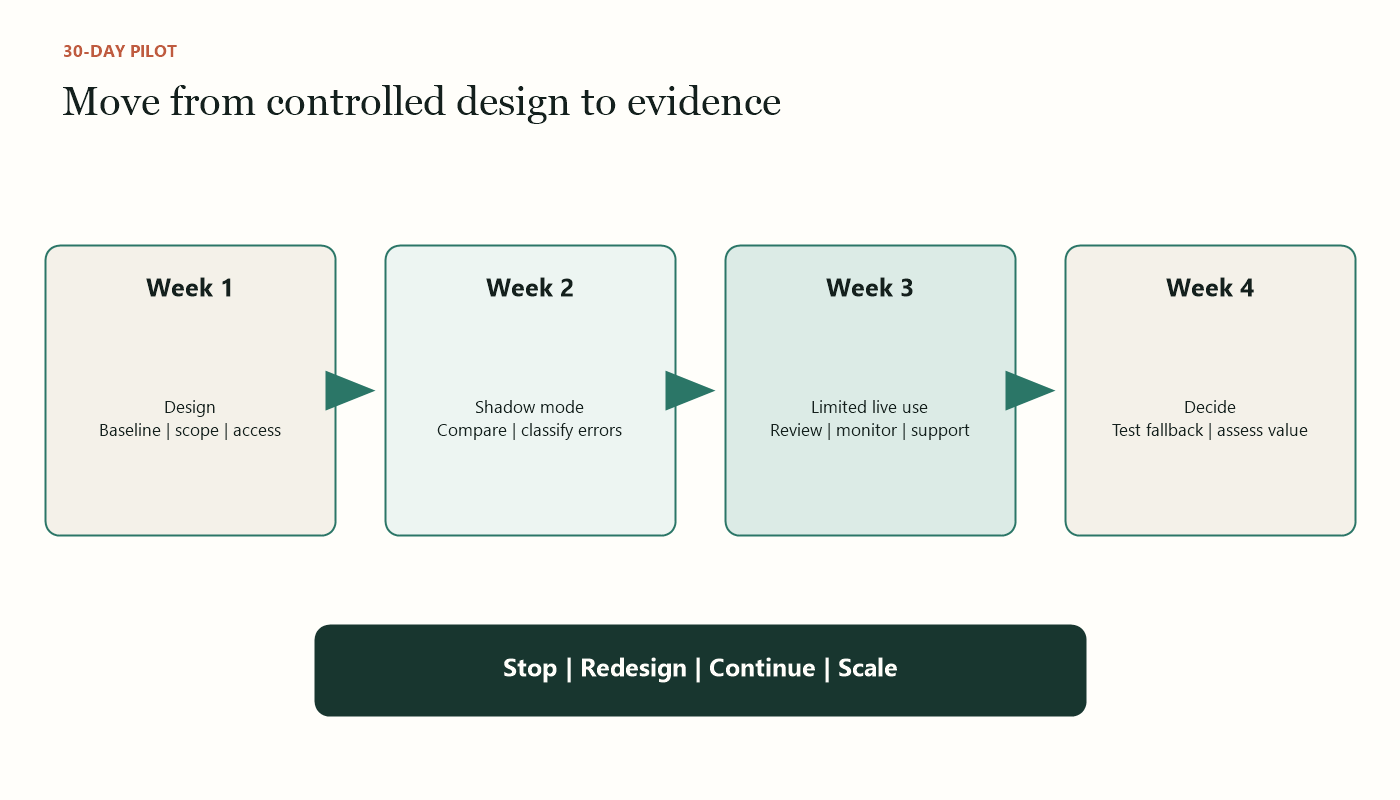
Week 1: design and prepare
The first week is about the process, examples and controls.
Days 1–2: document the task
Map the trigger, inputs, decisions, output and handover. Mark information that is often missing. List exceptional cases and the person who resolves them.
Define a good output. For an enquiry summary, the standard might be: no more than five bullets, no invented facts, the customer’s wording preserved for critical requirements, missing information stated clearly and a link to the original submission.
Days 3–4: prepare instructions and examples
Create a short operating prompt or configuration. Include the assistant’s role, approved sources, required format, prohibited claims and escalation conditions.
Prepare representative examples, including messy ones. Test incomplete inputs, conflicting statements, unusual terminology and requests outside scope. A pilot based only on clean examples will overstate reliability.
Days 5–7: configure access and train users
Use managed business accounts where possible. Apply the minimum permissions needed. Confirm the service’s data-use, retention and access settings before entering business information.
Train users on the workflow rather than presenting a broad lesson about AI. Show what they submit, how they review, what they must never include and how to flag a problem. Provide a one-page guide beside the tool.
Week 2: run in shadow mode
During shadow mode, employees complete the existing process and compare it with the assistant’s output. The AI does not control the official outcome.
This may feel inefficient, but it is the safest way to learn. The team can compare accuracy without risking customer commitments or business records.
For each case, record:
- whether the output was usable without correction;
- time needed to review and correct it;
- severity of any error;
- information omitted or invented;
- whether the assistant correctly identified uncertainty; and
- whether the human preferred the existing method.
Classify corrections. A style preference is different from a wrong amount or missing deadline. Use categories such as formatting, incomplete, unsupported statement, wrong classification, sensitive data concern and workflow failure.
Hold two short reviews during the week. Adjust instructions only when a pattern appears. Constant changes make results difficult to compare and can hide whether the original design was weak.
Week 3: limited live use
If shadow-mode results meet the agreed threshold, allow the assistant’s output into the live process with a mandatory human checkpoint.
For example, the AI-generated summary can become the first draft inside the enquiry record, but an employee must approve it. A proposed acknowledgement can be copied into email only after review. The system should preserve the original source so the reviewer can verify important details.
Do not expand the use case during this week. The purpose is to observe whether the assistant works under normal time pressure and whether employees actually follow the approval procedure.
Watch for two opposite risks. Some employees may distrust every output and repeat the entire task, eliminating the benefit. Others may develop automation bias and approve polished work too quickly. Training and interface design should support efficient but meaningful review.
Track operational effects beyond accuracy. Does the assistant create a new queue? Does a manager become the bottleneck because every item requires approval? Are employees copying information into an unapproved personal account when the managed tool is inconvenient?
Week 4: stabilise and decide
Use the final week to test the operating model, not to add features.
Run several failure scenarios:
- the AI service is unavailable;
- a source document is outdated;
- a user submits sensitive information;
- the assistant returns an empty or malformed output;
- the connected system rejects an update; and
- the process owner is absent.
The fallback should be understandable. Employees must know whether to continue manually, hold the case or escalate it. A pilot is not ready to scale if the process stops whenever the AI does.
Review permissions and logs. Confirm that former test users no longer have access if their role changed. Remove unnecessary sample data. Update the one-page operating guide with lessons from the month.
Then compare results with the baseline.
Use a balanced scorecard
Evaluate the pilot across five areas.
Efficiency
Measure total handling time, including prompt preparation, review and correction. Note whether work moves faster through handovers.
Quality
Measure usable outputs, material errors and recurring correction types. Averages can conceal serious mistakes, so report severity as well as frequency.
Adoption
Measure whether intended users follow the process and find it easier. Investigate both avoidance and over-reliance.
Risk and control
Review access, sensitive-data incidents, unauthorised actions and whether human approvals were recorded.
Sustainability
Identify who maintains instructions, source documents, permissions and vendor settings. Estimate ongoing effort and subscription costs.
Agree on thresholds before reviewing the final numbers. Otherwise, enthusiasm can move the definition of success after the result is known.
Decide: stop, redesign, continue or scale
Stopping can be a successful pilot outcome. The team may discover that a template, form redesign or simple workflow solves the problem more reliably. That knowledge prevents a larger, unnecessary purchase.
Redesign when the use case is valuable but the process, data or checkpoint is wrong. The assistant may need a narrower scope, better source documents or a different interface.
Continue at the same scale when evidence is promising but the volume or variation is insufficient. Extend the observation period without adding features.
Scale only when the output meets quality thresholds, users follow the controls, the fallback works and a named owner accepts ongoing responsibility. Expansion should proceed one dimension at a time: more volume, more users, more data or more autonomy—not all four together.
Common pilot mistakes
The first mistake is choosing the most impressive use case instead of the most measurable one. The second is involving only senior managers, who may not see daily exceptions. The third is testing without real variation. The fourth is ignoring review time. The fifth is buying an annual licence before the operating model is proven.
Another mistake is treating prompts as the complete solution. Reliable performance also depends on current source information, permissions, user training, fallback steps and accountability.
Finally, do not hide the pilot from employees whose work it affects. Explain the problem being tested, what will be measured and what the technology will not decide. Invite corrections. Staff resistance often contains useful information about exceptions and risks that the project team has missed.
What good looks like after 30 days
At the end of a strong pilot, the SME has more than a collection of impressive outputs. It has a measured result, an error profile, a documented human checkpoint, a data boundary, a fallback procedure and a named owner.
The business may decide to expand the assistant, keep it narrow or replace it with a simpler workflow. Each is a valid decision when supported by evidence.
The aim is not to prove that AI belongs everywhere. It is to discover where AI reduces genuine administrative effort without weakening judgement, privacy or accountability. A disciplined 30-day pilot provides that answer with limited disruption and a clear route to the next decision.
Sources and further reading
- IMDA: Model AI Governance Framework for Agentic AI
- PDPC: Singapore’s Approach to AI Governance
- NIST: Artificial Intelligence Risk Management Framework
Want to make this practical for your business?
Start with the operational problem, the people involved and the outcome you need.