No-code tools have changed who can improve a business process. An operations executive can connect a form to a spreadsheet. A finance manager can route an approval. A sales coordinator can create reminders and update records without waiting for a software development project.
That accessibility is valuable. It also creates a new category of business dependency that can become important before anyone formally recognises it.
A workflow built on Friday afternoon may begin as a personal convenience. Six months later, three departments rely on it to process customer requests. The original maker changes role, the password expires or a connector is updated. Nobody knows how the workflow works, who may change it or what to do when it stops.
The failure is not that the tool was “no-code”. The failure is that the business treated easy creation as proof that ongoing ownership was unnecessary.
Governance does not have to mean a central committee reviewing every personal shortcut. It means applying controls in proportion to business consequence. The more people, data and decisions an automation touches, the clearer its ownership and operating discipline must become.
Why no-code automations become invisible infrastructure
Traditional technology projects usually announce themselves. They have a budget, vendor, project plan and handover. No-code automations often grow quietly.
An employee creates a flow to save an attachment. A colleague asks to use it. A manager adds an approval. The flow is copied for another team. Soon it supports a critical process, but it still runs under one employee’s account and is documented only in that person’s memory.
This creates several risks:
- the automation stops when an account, licence or password changes;
- a maker unintentionally exposes business data through a connector;
- a change fixes one scenario but breaks another;
- nobody notices that failures have been accumulating;
- several near-identical versions produce inconsistent results; and
- the business cannot explain who approved the logic.
Microsoft’s Power Platform guidance, for example, treats environments, roles, data policies, monitoring and the division of responsibility between administrators and business makers as parts of one governance model. The exact features vary by platform, but the operating questions apply to any no-code tool.
Start by classifying the automation
Not every automation needs the same ceremony. Use three levels.
Level 1: Personal productivity
The automation supports one person, uses low-sensitivity information and creates no material consequence for customers, payments, access or records.
Examples include renaming personal working files or creating a private reminder from a calendar event.
The maker can own this level, subject to the company’s approved-tool and data rules. Documentation can be minimal.
Level 2: Team workflow
The automation is used by several people, writes to a shared system, routes work or handles customer or employee information.
Examples include creating a shared task from a website enquiry or routing a leave request for approval.
This level needs a named business owner, a backup technical owner, basic documentation, tested changes and failure monitoring.
Level 3: Business-critical automation
The automation affects money, contractual commitments, permissions, regulated information, customer fulfilment or a process whose interruption would materially affect operations.
Examples include approving a refund, generating an invoice, changing system access or sending a final customer decision.
This level needs formal approval, separate development and production arrangements where the platform supports them, least-privilege service accounts, change control, logs, recovery procedures and periodic review.
Classification prevents two common extremes: ignoring important automations because they were easy to build, and imposing enterprise-level controls on every minor personal workflow.
The four roles every shared automation needs
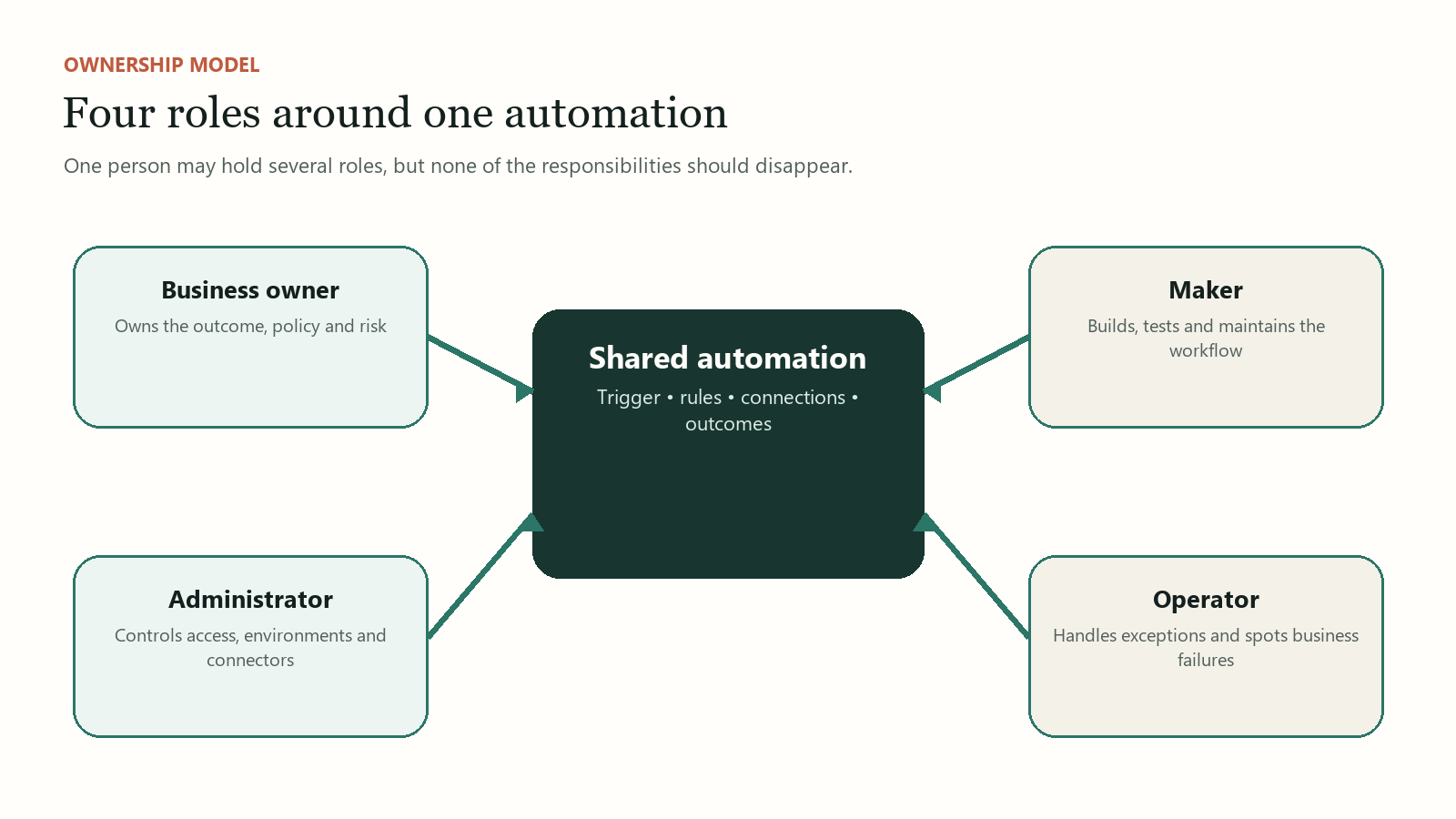
One person may hold several roles in a small company, but the responsibilities should still be distinguished.
The business owner
The business owner is accountable for the outcome. This person decides what the workflow is meant to achieve, approves the rules, resolves policy questions and accepts the operational risk.
For a purchase-approval workflow, the owner might be the finance manager rather than the employee who built the flow.
The business owner should be able to answer:
- What process does this automation support?
- Which decisions are automated and which remain human?
- What is the consequence of delay or error?
- Which records must be kept?
- Who may approve a change?
Technical ownership cannot replace business accountability. A developer can confirm that a rule works as configured but cannot decide whether the rule reflects current policy.
The maker or technical owner
The maker designs and maintains the automation. The role includes understanding connectors, credentials, error handling, platform limits and version history.
For a shared or critical workflow, the maker should not be the only person with access or knowledge. Assign a backup and store documentation in a company-controlled location.
The platform administrator
The administrator manages the environment around the automation: licences, account access, security groups, approved connectors, data policies, audit capabilities and offboarding.
In a very small SME, this role may be performed by an external IT provider. The company still needs to define the provider’s authority, response expectations and handover obligations.
The process operator
The operator sees the workflow in daily use. This person handles exceptions, confirms outputs and reports failures. Operators often detect problems before technical monitoring does because they understand what “normal” work looks like.
Include operators in testing. A technically successful run can still be operationally wrong if it assigns the task to the wrong role or omits information employees need.
The minimum governance record
Every Level 2 or Level 3 automation should have a short record containing:
- business purpose and owner;
- maker and backup owner;
- trigger, inputs, outputs and connected systems;
- data categories processed;
- account or connection dependencies;
- approval points and prohibited actions;
- expected operating frequency;
- failure notification route;
- last tested date and test cases;
- recovery or manual fallback; and
- retirement criteria.
This can fit on two pages. The goal is not to document every screen click. It is to give another competent person enough context to operate, diagnose and safely change the workflow.
Control connections, not only the visible flow
A no-code canvas may show neat boxes and arrows while hiding the most important security detail: each connector carries authority.
A connection to email may read messages or send as a user. A file connector may access shared folders. A CRM connector may create, update or export customer records. The automation can only be as safe as the permissions behind these connections.
Apply least privilege. Use a company-managed service account for important shared automations when the platform and licensing model support it. Do not let a production process depend on a personal account merely because it was convenient during the prototype.
Review which connectors may exchange business data. Some platforms provide data policies that classify, restrict or block connector combinations. These controls reduce the risk of an employee unintentionally connecting an approved business source to an unapproved consumer service.
Also consider where the automation runs. Development, testing and production should be separated for critical workflows when possible. Microsoft explicitly warns that its default Power Platform environment is intended for exploration and lightweight trials and does not provide the backup guarantees expected for production workloads.
Change control can remain lightweight
“Change control” sounds bureaucratic, but a simple version prevents many incidents.
Before a material change:
- Describe the reason and expected effect.
- Save or export the current version where supported.
- Test normal, incomplete and exceptional cases.
- Obtain approval from the business owner.
- Schedule the release when support is available.
- Confirm results after deployment.
- Record the date, person and change.
For Level 3 automations, avoid editing the live version first. Test in a separate environment or copy with safe test data. If the platform does not support strong environment separation, compensate with stricter scheduling, backups and rollback instructions.
Small changes can have wide consequences. Renaming a spreadsheet column may break a flow. Changing a form choice may route requests incorrectly. Updating a folder permission may cause silent failures. The business should treat connected components as part of the automation, even when the visual workflow itself was not edited.
Monitoring: know when the process is failing
An automation that fails loudly is easier to manage than one that quietly skips work.
Define both technical and business monitoring.
Technical monitoring includes failed runs, authentication problems, connector errors, timeouts and platform capacity limits. Alerts should go to an actively monitored shared destination, not only the original maker.
Business monitoring asks whether expected outcomes occurred. If the company normally receives twenty enquiries a day and the CRM receives none, a “successful” automation log may not tell the whole story. Reconcile source and destination counts where the consequence matters.
Track a few practical measures:
- successful and failed runs;
- items awaiting manual intervention;
- average time from trigger to completion;
- exceptions by type;
- manual overrides; and
- repeated failures after a recent change.
Do not collect logs nobody reviews. Assign a person and frequency.
Design the manual fallback before failure
Every important automation should have a temporary manual route. The fallback need not be elegant. It must be clear enough to keep the business moving without creating unsafe duplication.
For example: if the automated approval fails, requests are entered into a controlled shared register, the authorised manager approves through a defined channel and the operator updates the main system after service resumes.
State when the fallback begins, who declares it, how duplicate processing is prevented and how records are reconciled afterward.
A fallback also improves testing. It forces the team to understand the essential process rather than assuming the automation itself is the process.
Manage the citizen-development pipeline
Employees closest to the work often identify the best automation opportunities. Governance should preserve that advantage.
Create a visible path:
- employees may experiment with low-risk personal tasks using approved tools;
- promising shared workflows are registered and reviewed;
- the business classifies the workflow and assigns an owner;
- higher-risk designs receive technical or data-protection input;
- successful pilots move into a managed production arrangement; and
- unused or duplicate automations are retired.
This is more effective than pretending employees will not build. It gives useful ideas a route to become dependable assets.
Questions to ask about every existing automation
An SME can perform a first governance audit by asking:
- Does more than one person depend on this workflow?
- Who owns the business rule?
- Who can edit or disable it?
- Which accounts and connectors does it use?
- What data passes through it?
- How would we know it failed?
- When was it last tested?
- Is there a backup owner?
- What is the manual fallback?
- Can we retire or consolidate it?
Start with workflows that affect customers, money, access or shared records. Do not attempt to catalogue every personal shortcut in one week.
Easy to build should also mean easy to own
No-code tools reduce the distance between an operational problem and a working solution. They do not remove responsibility for access, data, rules, monitoring or continuity.
The practical governance model is simple: classify the automation, name the business and technical owners, control its connections, test changes, monitor outcomes and maintain a fallback.
That discipline does not take ownership away from business teams. It turns their useful experiments into systems the company can safely depend on.
Sources and further reading
- Microsoft: Security and Governance Considerations in Power Platform
- Microsoft: Power Platform Environments Overview
- Microsoft: Manage Data Policies
- CSA: Cyber Essentials
Not sure where to begin?
Start with the process that is taking too much time or creating uncertainty. Discuss the problem with Syahmul Aziz