A customer submits an enquiry. Someone copies it into a spreadsheet, forwards it to a colleague and sets a personal reminder. A quotation is prepared from an old document. Approval happens in a messaging thread. After delivery, finance waits for confirmation before raising the invoice.
Every step may appear manageable on its own. The operational cost sits between the steps: duplicated typing, missing context, uncertain ownership, forgotten follow-ups and delays that nobody can see end to end.
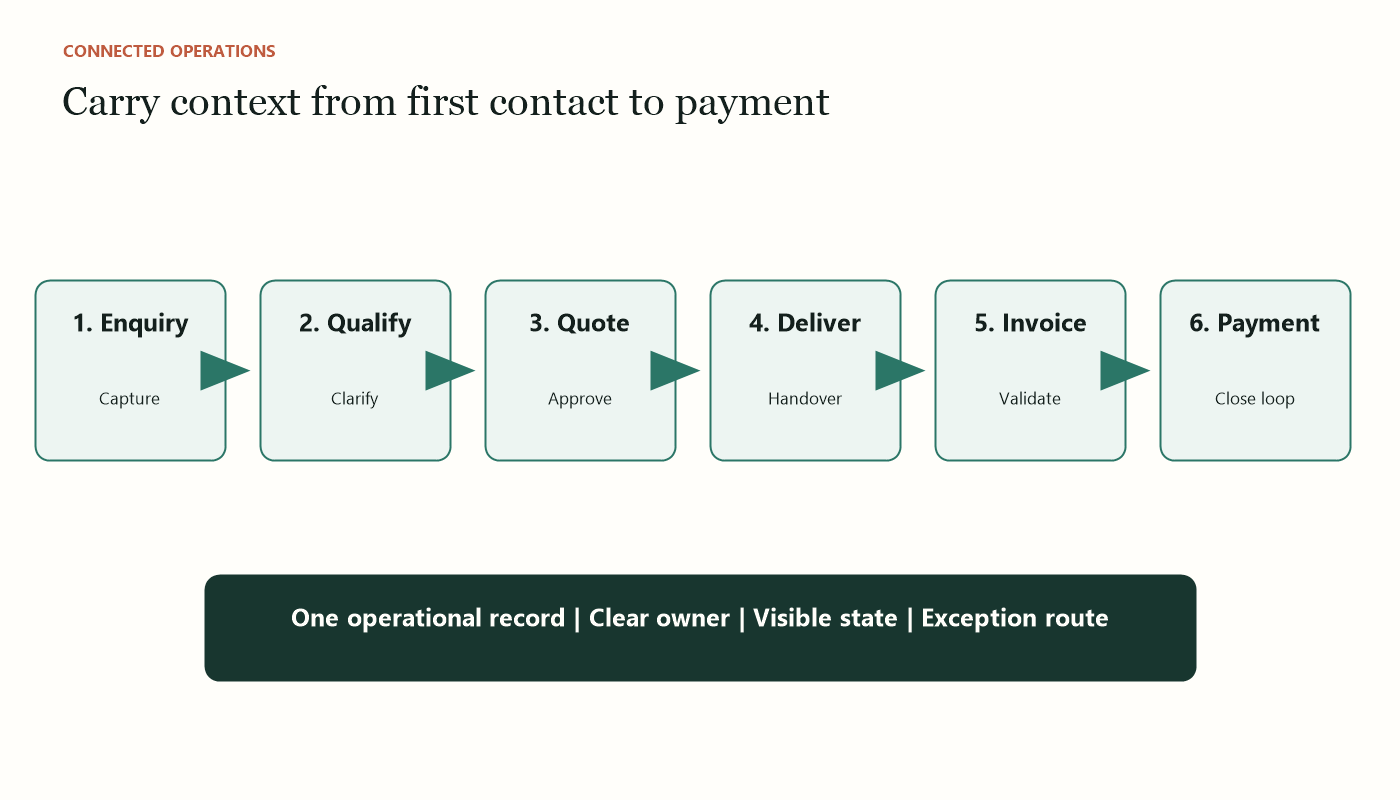
An enquiry-to-invoice workflow connects these handovers. It does not require one enormous system. It requires a consistent record, clear states, dependable ownership and carefully chosen automation.
This article explains how an SME can design that workflow around the way people actually work, while keeping commercial judgement and important approvals with responsible employees.
Why the handovers matter
Most businesses already have tools for email, documents, accounting and task management. The problem is that each tool represents only part of the customer journey.
Sales may know that the customer accepted a revised scope, but operations sees the original quotation. Operations may complete the work, but finance does not know it is ready to bill. A manager may approve a discount in chat, but the decision never reaches the official record.
These gaps create four forms of waste:
- re-keying: the same customer and project information is entered repeatedly;
- waiting: work pauses because the next person does not know it is ready;
- reconciliation: employees compare emails, files and systems to establish the truth; and
- recovery: the team chases missed tasks, corrects documents or explains delays.
The goal of a connected workflow is not merely faster data transfer. It is a shared understanding of what stage the work has reached, what must happen next and who is accountable.
Define the journey in business states
Begin with states that employees recognise. A simple service-business workflow might use:
- New enquiry
- Information required
- Qualified
- Quotation in preparation
- Quotation awaiting approval
- Sent to customer
- Accepted or declined
- Delivery in progress
- Ready to invoice
- Invoiced
- Paid or overdue
A state should mean something operational. “In progress” is too vague if nobody knows whether it means preparing a proposal, awaiting customer information or delivering the work.
For each state, define the entry condition, required information, owner, next possible states and exception route. This creates the backbone for automation.
Avoid designing dozens of states to represent every minor activity. Too much detail makes the workflow difficult to maintain and encourages users to stop updating it. Track tasks beneath the state when appropriate.
Establish one operational record
A connected workflow needs a record that carries the essential context from enquiry to invoice. It may live in a CRM, work-management tool, database or a carefully designed shared list. The platform is less important than the discipline.
The record should include:
- customer and contact details;
- source and date of enquiry;
- summary of the need;
- service or opportunity category;
- assigned owner;
- current state and next action date;
- quotation version and approval status;
- accepted scope and commercial terms;
- delivery owner and completion evidence;
- invoice reference and payment status; and
- links to supporting documents.
Do not duplicate full documents inside every system. Store the approved file in a controlled location and link to it. Decide which system is authoritative for each field. Customer contact data might belong in the CRM, while the accounting system owns invoice and payment status.
The operational record should point to those sources rather than competing with them.
Stage 1: capture the enquiry cleanly
The workflow begins before the form is submitted. Ask for enough information to route the request, but not so much that potential customers abandon it.
Use required fields for information the business truly needs. Validate email addresses and structured selections. Keep a free-text field so the customer can describe the problem in their own words.
On submission, automation can:
- create the operational record;
- assign a unique reference;
- preserve the original message;
- send a truthful acknowledgement;
- notify the appropriate queue; and
- set a response target.
The acknowledgement should not promise a fit, price or delivery date. It should confirm receipt and explain the next step.
AI can summarise long enquiries or suggest a category, but the original message should remain visible. When confidence is low or the issue appears sensitive, route it for manual review.
Stage 2: qualify without losing context
Qualification determines whether the business should invest in a proposal. The criteria might include problem fit, urgency, decision-maker access, budget expectations, delivery constraints and conflicts.
Make the criteria explicit. A checklist improves consistency while leaving room for judgement. Record why an opportunity proceeds, pauses or closes. That history helps the business understand demand and avoids repeatedly reconsidering the same case.
Automation can remind the owner when information is missing, prepare a standard clarification request and schedule a follow-up. It should not reject a customer solely because an AI-generated score appears low.
If a conversation occurs by phone or meeting, add a concise note to the operational record. Important commitments should not exist only in personal memory.
Stage 3: create and control the quotation
Quotation errors often arise from uncontrolled templates and manual copying. Use one approved template with structured fields for customer information, scope, assumptions, exclusions, pricing, validity and payment terms.
The workflow can populate standard information and create a draft document. The responsible person then adjusts the scope and commercial content.
Introduce approval rules based on consequence. A standard quotation within approved pricing may need one reviewer. A large discount, unusual liability, non-standard payment term or important customer commitment may require management approval.
Record the approved version. If the quotation changes, create a new version and preserve the prior decision. Sending a document should update the state and next follow-up date automatically.
Do not confuse document generation with commercial judgement. Automation can assemble the proposal; an authorised person owns what the company promises.
Stage 4: convert acceptance into delivery
Customer acceptance should trigger a controlled handover. The team needs to know what was agreed, not merely that a sale occurred.
Capture evidence of acceptance and the final scope. Create delivery tasks, assign an owner, schedule milestones and provide links to the approved quotation and supporting material.
The handover should highlight:
- deliverables and exclusions;
- dates and dependencies;
- customer responsibilities;
- internal owner;
- approval or sign-off requirements;
- billing milestones; and
- known risks or special arrangements.
Automation can create the project structure and notify the team. A short human handover may still be necessary when context is complex. The aim is to reduce information loss, not eliminate useful conversation.
Stage 5: define “ready to invoice”
Many invoice delays occur because delivery completion is ambiguous. Operations believes the work is finished; finance waits for a manager; the customer expects another item.
Define the evidence required before billing. Depending on the business, that may be a signed delivery order, approved timesheet, milestone acceptance, completion checklist or internal confirmation tied to the agreed billing schedule.
When the evidence is recorded, the workflow can change the state to “ready to invoice” and notify finance with the required details. Finance should not reconstruct the project from email.
Validate the legal entity, billing contact, purchase order, tax treatment, amount and payment terms. The accounting system should remain the authority for invoice numbering and ledger records.
Singapore businesses should also consider their InvoiceNow obligations and implementation timeline. GST InvoiceNow requirements are being introduced progressively. The connected workflow should therefore integrate with an InvoiceNow-ready accounting solution where applicable rather than creating a parallel invoice process.
Stage 6: connect invoice and payment status
Once the invoice is issued, write the reference and date back to the operational record. This lets sales and delivery employees see that billing occurred without giving them unnecessary accounting access.
Payment reminders should follow the company’s policy. Automation can identify approaching and overdue dates, prepare reminders and escalate long-outstanding amounts. A person should review disputed invoices, important accounts and unusual circumstances before communication.
When payment is recorded, close the commercial loop. Notify the relevant owner, update the state and trigger any appropriate completion or follow-up activity.
The business can then measure conversion time, quotation turnaround, delivery-to-invoice delay and days to payment across the complete journey.
Decide what to automate
Separate work into three categories.
Automate deterministic movement
Create records, copy approved fields, set dates, send internal notifications and update states when clear conditions are met. These tasks benefit from consistency and auditability.
Assist language-heavy preparation
Use AI to summarise enquiries, prepare clarification questions, draft standard correspondence or extract information from varied documents. Keep the source visible and require review according to consequence.
Preserve human decisions
Qualification, pricing exceptions, scope commitments, complaints, delivery acceptance and disputed payments require accountable judgement. Technology should present the information and record the decision, not hide who made it.
Design exception routes before the happy path
Real workflows contain missing purchase orders, changed scopes, duplicate enquiries, declined quotations, partial delivery, invoice disputes and customers who stop responding.
For each stage, ask what can prevent normal progression. Define who receives the exception, what information they need and how the record returns to the main flow.
Never let a failed integration silently discard work. If the accounting system rejects an invoice request, create a visible task and preserve the details. If an acknowledgement email bounces, flag the record rather than marking communication complete.
An exception queue is not evidence that automation failed. It is evidence that the design recognises reality.
Implement in slices
Do not connect the entire journey in one release. Begin with the handover causing the clearest pain.
A sensible sequence is:
- form submission to operational record;
- ownership, next-action dates and reminders;
- quotation generation and approval;
- accepted scope to delivery setup;
- completion evidence to invoice request; and
- invoice and payment status feedback.
Measure each slice before expanding. Confirm that employees update the record, exceptions are visible and time is genuinely saved.
Keep a manual fallback during transition. Avoid running two competing official processes indefinitely, but do not remove the old route until the new one has been tested with normal and exceptional cases.
Measures that reveal improvement
Track outcomes rather than automation counts.
Useful measures include:
- median time from enquiry to first meaningful response;
- percentage of enquiries with a named owner and next action;
- quotation turnaround time;
- acceptance rate by opportunity type;
- time from acceptance to delivery kickoff;
- time from completion evidence to invoice issuance;
- rework caused by missing or inconsistent information;
- overdue invoice value and age; and
- number and cause of workflow exceptions.
Review measures by stage. A faster enquiry response is not useful if quotation approval becomes the new bottleneck.
What a connected workflow should feel like
Employees should not need to ask, “Where is this customer at?” The record should show the current state, responsible person, next action and approved documents.
Customers should receive timely, accurate communication without being trapped in robotic sequences. Managers should see delays and exceptions without chasing individual employees. Finance should receive complete billing information when the work is actually ready.
This does not require replacing every tool. It requires clear ownership of data and disciplined handovers between tools.
The strongest enquiry-to-invoice workflow combines predictable automation, selective AI assistance and human judgement. It moves routine information automatically, prepares language-heavy work for review and records consequential decisions transparently.
Begin with the customer journey, not a platform feature list. Define the states, establish the operational record and fix the most painful handover first. The result is not merely a faster process. It is a business that can see and manage its work from the first expression of interest to the final payment.
Sources and further reading
- IRAS: GST InvoiceNow Requirement
- IMDA: SMEs Go Digital
- Enterprise Singapore: Productivity Solutions Grant
Want to make this practical for your business?
Start with the operational problem, the people involved and the outcome you need.